Email Infrastructure and Service Providers
The Beginner’s Guide to Setting Up Email Infrastructure That Actually Works
minute read

Key Takeaways
- Building a reliable email infrastructure is essential for successful email marketing and achieving strong performance.
- To increase your chances of reaching your audience, you need to start with a robust email infrastructure.
- Ongoing monitoring of deliverability metrics and email health is necessary to maintain and enhance your infrastructure performance.
So, you’ve got a great email campaign ready to go. The copy is sharp, the design is snappy, and you’re excited to hit send. But here’s the thing—none of that matters if your emails never make it to the inbox.
That’s where email infrastructure comes in. Think of it as the behind-the-scenes plumbing that determines whether your emails land where they’re supposed to or disappear into a spam folder. Getting that infrastructure right isn’t glamorous, but it’s often the difference between a campaign that drives results and one that goes nowhere.
Here’s how to build it the right way.
What is email infrastructure, exactly?
At its core, email infrastructure is the technical system that sends, routes, and delivers your emails. It includes your sending domain, the servers that handle delivery, the security protocols that prove you’re a legitimate sender, and the tools you use to keep an eye on everything. Without a solid foundation here, even the most beautifully crafted email is going nowhere useful.
1. Choose the right ESP
Your ESP is the engine behind your entire email program—and choosing the wrong one is a costly mistake. Before you commit (or decide whether or not to make a switch), ask the right questions to determine whether a platform will support your program long-term.
- Can it actually deliver? This means dedicated IP options, full DMARC, DKIM, and SPF support, and complaint feedback loop management.
- How does it handle list management? Can the platform support preference centers, custom opt-in and opt-out flows, and suppression rules at the mailbox provider level? The ability to reduce send frequency for lapsed subscribers—rather than just unsubscribing them—is a particularly underrated feature at enterprise scale.
- Does the reporting go beyond surface-level metrics? Push for real-time data, bounce code visibility, click and conversion tracking, and clarity on how the platform handles Apple’s Mail Privacy Protection opens so your engagement data stays meaningful.
- Can it scale with you? Look for flexible list management, the ability to throttle sends, suppress by mailbox provider, support A/B testing, and build journeys that match how your program actually runs.
- Will you have the right support when it counts? A dedicated support team, hands-on IP warming guidance, and a realistic support turnaround time aren’t perks—at enterprise volume, they’re table stakes.
2. Set up a dedicated sending domain
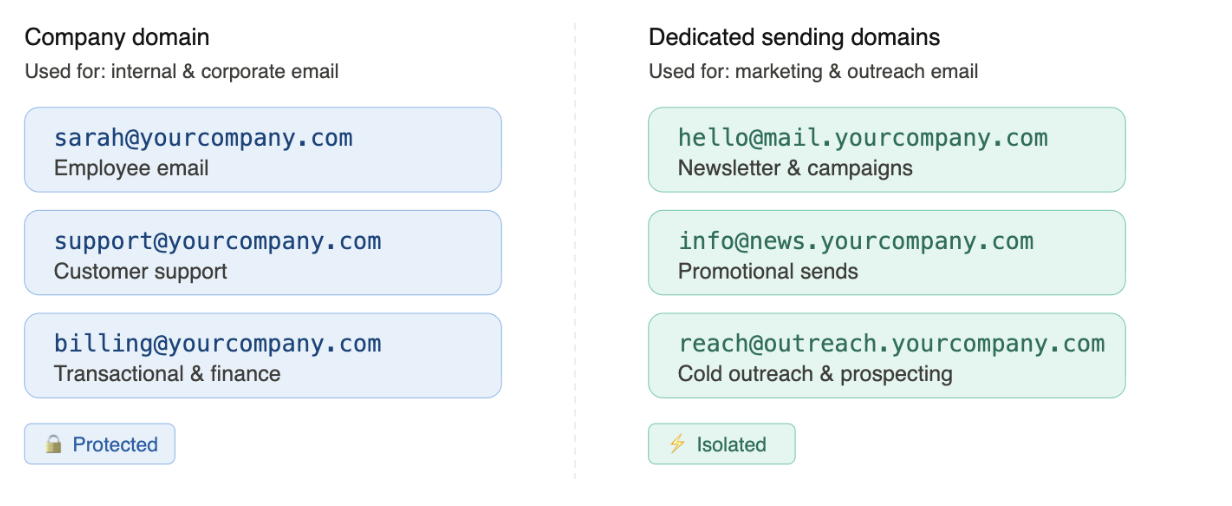
First things first—don’t send marketing emails from your main company domain. If something goes wrong (a spam complaint spike, a blocklisting), you don’t want that dragging down the domain your whole business runs on. Instead, create a dedicated domain or subdomain just for outreach.
For example, if your main company domain is yourcompany.com, you’d keep that strictly for business email and set up something like marketing.yourcompany.com, or even a separate domain entirely like yourcompany-news.com for marketing sends. It keeps your corporate email squeaky clean and gives you a controlled environment to build your sender reputation from scratch.
3. Configure your authentication protocols (this part is non-negotiable)
Email authentication used to be “best practice.” Now it’s a requirement. Major mailbox providers like Gmail, Yahoo, and Microsoft have made authentication mandatory for bulk senders—and that enforcement is only tightening. If you skip this step, your emails won’t just underperform; they’ll likely be blocked outright.
Your IT team or domain administrator can usually set up these three protocols:
- SPF (Sender Policy Framework) is essentially a published list telling the world which servers are authorized to send email on your domain’s behalf. It stops bad actors from spoofing your domain to send spam.
- DKIM (DomainKeys Identified Mail) attaches a digital signature to every email you send. The receiving server checks that signature against a public key in your DNS records to confirm the message wasn’t tampered with in transit.
- DMARC (Domain-based Message Authentication, Reporting, and Conformance) is the policy layer that ties SPF and DKIM together. It tells receiving servers what to do when an email fails authentication—quarantine it, reject it, or let it through—and sends you reports so you can see who’s sending email using your domain. Don’t leave DMARC at p=none (monitoring-only) indefinitely—the goal is to eventually move to p=quarantine or p=reject for full protection.
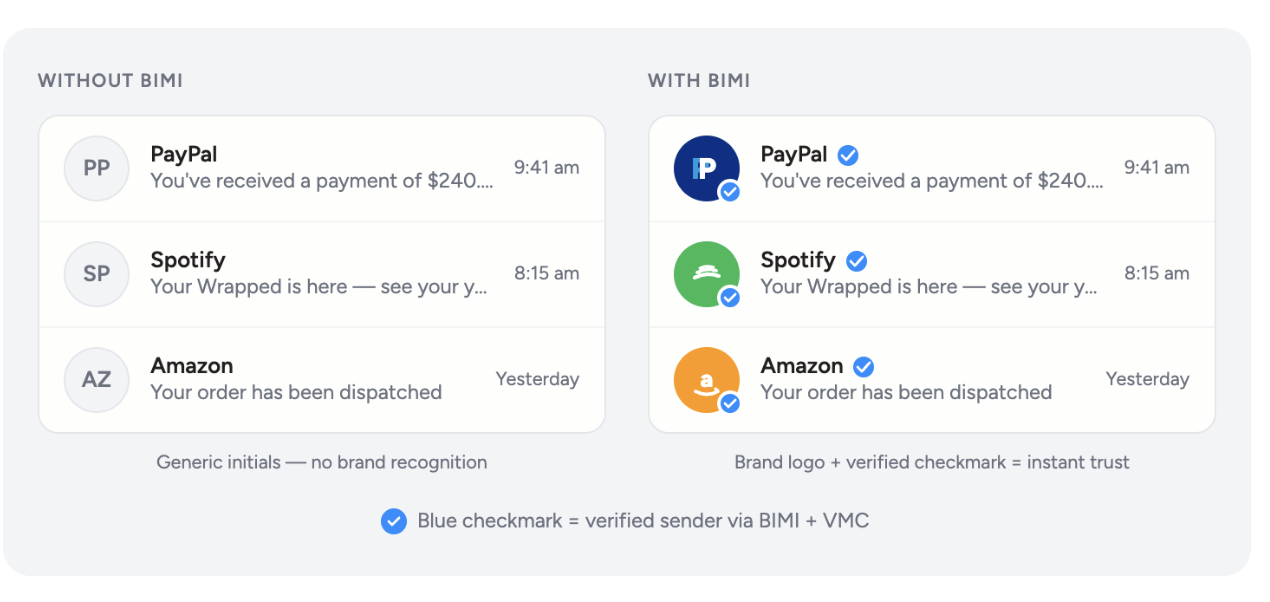
- One more worth knowing about: BIMI (Brand Indicators for Message Identification). Once you’ve got DMARC enforcement in place, BIMI lets you display your brand logo right in the inbox next to your sender name. Think of it as the reward you get for doing all the authentication work correctly.
4. Warm up your domain—patiently
A brand-new domain has zero reputation with mailbox providers—and sending a large blast of emails right out of the gate is one of the fastest ways to get flagged as spam. Instead, start slow and build your reputation with mailbox providers gradually.
A solid warmup approach: start with around 500–1,000 emails per day in your first few days, sending only to your most engaged contacts—people who’ve recently clicked or opened. Every couple of days, roughly double your volume, as long as your bounce rate and spam complaints stay low. If those metrics spike, pull back before pushing forward.
This process takes weeks, not days. That’s okay. The sender reputation you build through a careful warmup is the foundation for everything else rests on.
5. Monitor your deliverability (more than you think you need to)
Here’s something that surprises a lot of senders: an email can be technically “delivered” according to your ESP and still never be seen. Validity’s 2026 Email Deliverability Benchmark report reveals that 1 in 7 legitimate, permission-based marketing emails never reach the inbox.
This is why active monitoring matters. Keep your spam complaint rate below 0.3 percent (but ideally 0.1 percent or less). Watch for hard bounces, monitor your blocklisting status, and sign up for free feedback loops from the major providers: Google Postmaster Tools, Microsoft SNDS, and Yahoo Sender Hub are all worth using. They give you visibility into how the big inbox providers actually see your sending reputation—not just whether your emails were accepted at mailbox providers’ gateways.
It’s worth the effort
Setting up solid email infrastructure isn’t the most exciting part of email marketing, but it’s the part that makes everything else work. Authentication requirements are only getting stricter, inbox algorithms are getting smarter, and the gap between senders who invest in their infrastructure and those who don’t is widening fast.
Start with the right foundation, warm up carefully, and keep a close eye on your metrics—and you’ll be in a much better position to reach the people you’re trying to reach.
Need help navigating the technical side? Validity’s Professional Services team can audit your setup, configure your authentication protocols, and keep your deliverability on track.