Email Security and Authentication
The True Story of Email Authentication and How to Untangle the Acronyms
minute read

Key Takeaways
- Email authentication—including SPF, DKIM, and DMARC—is now required by major mailbox providers like Gmail, Yahoo, and Microsoft.
- Each authentication standard plays a distinct role in verifying your identity and protecting your domain from spoofing and phishing.
- Proper authentication builds subscriber trust and is the foundation of strong email deliverability.
If you’ve spent any time thinking about email deliverability, you’ve probably heard the term “email authentication” thrown around. But what does it actually mean? Why does it matter to your email program?
Email expert Dela Quist recently broke it down in simple terms on our Email After Hours podcast:
Email authentication is the digital security measure that ensures each message:
- Is truly from the person who sent it
- Has not been tampered with
- Has been sent to the intended recipient
Several groups—including the IETF’s Anti-Spam Research Group, Yahoo, and Cisco— developed the foundation on which all email authentication standards rest. Those base policies have evolved into the five core authentication technologies working to safeguard your email on its journey to the inbox today: SPF, DKIM, DMARC, ARC, and BIMI.
If you’re feeling overwhelmed by the technical jargon and acronyms, don’t worry! Let’s take a closer look at each authentication measure, why they are important, and how they impact your email campaigns—with words we use in the real world.
Mailbox provider authentication requirements
Mailbox providers (MBPs) have made it clear that proper authentication isn’t optional anymore. The recent mandates from Gmail, Yahoo, and Microsoft have cemented that reality for senders everywhere.
Here’s what’s now expected of all senders, bulk or not:
- SPF and DKIM must be set up for your sending domain.
- DMARC is required for bulk senders, with a minimum policy of p=none.
- One-click unsubscribe must be enabled for all commercial and promotional messages.
- Spam complaint rates should stay below 0.1 percent and must never reach 0.3 percent.
If you’re like most reputable senders and actually want subscribers to see your emails, you have to follow these requirements—there’s no way around them! Gmail has been progressively rejecting non-compliant traffic since April 2024, and as of late 2025, non-compliant senders are facing temporary and permanent rejections. Yahoo and Microsoft have taken a similarly firm stance.
Now that we know what’s at stake, let’s take a closer look at the five core authentication methods.
Sender Policy Framework (SPF)
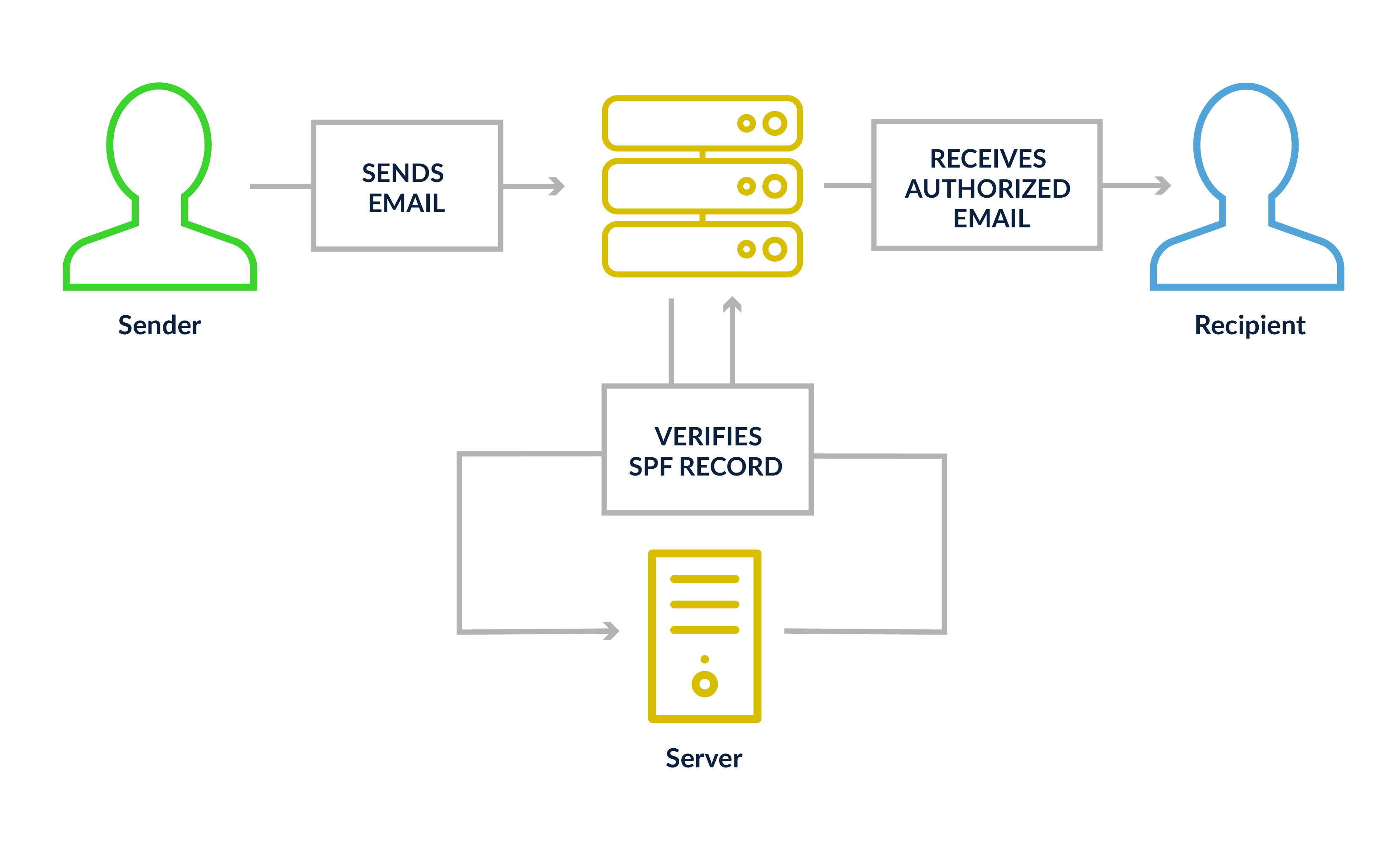
Think of SPF as a guest list. Your domain publishes a DNS record that tells receiving mail servers exactly which IP addresses are allowed to send email on your behalf. If a message shows up from an IP that isn’t on the list, the receiving server knows something’s off.
An SPF record can include individual IP addresses, ranges, or approved third-party senders like your ESP. You can also set enforcement levels that tell receiving servers how strictly to act on a failure—most senders should use either soft fail (~all) or fail (-all).
One thing to keep an eye on: every time you use the “include” function to add a third-party sender, it counts as a DNS lookup, and SPF has a hard limit of 10. Exceed that, and you’ll hit a “permerror,” which can cause SPF to fail entirely.
DomainKeys Identified Mail (DKIM)
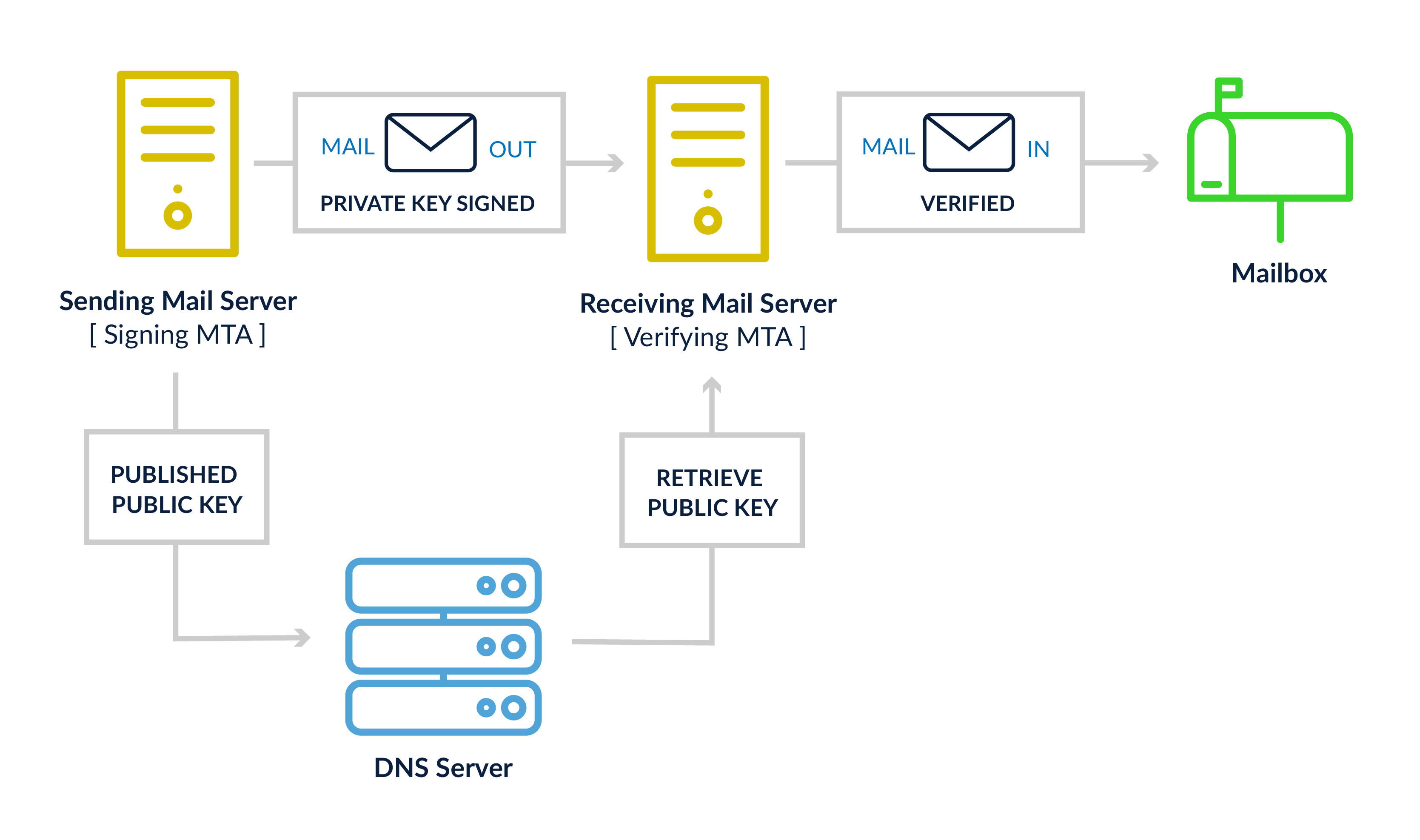
DKIM works like a tamper-evident seal on a package. When your mail server sends a message, it stamps it with a cryptographic signature using a private key. The corresponding public key lives in your DNS. When the receiving server gets your email, it checks the seal—if anything was changed in transit, the signature won’t match and DKIM fails.
One setup note: if you’re configuring your own DKIM keys, use a minimum key length of 2048 bits. Older 1024-bit keys no longer meet today’s security standards. Most ESPs handle this for you, but it’s worth confirming with your sending platform.
Domain-based Message Authentication, Reporting & Conformance (DMARC)
If SPF is the guest list and DKIM is the tamper seal, DMARC is the policy that decides what happens when either one raises a flag. It also adds an important check called alignment — the domain in your From address has to match the domain used in your SPF or DKIM record. Without that match, DMARC fails even if the underlying checks passed.
There are three policy levels that tell receiving servers how to handle failing messages: p=none (monitor only, take no action), p=quarantine (send to spam), and p=reject (block the message entirely). Starting at p=none is fine—it’s the minimum required for bulk senders—but moving toward p=quarantine or p=reject is the goal.
DMARC also comes with a reporting bonus: MBPs send daily aggregate reports showing which messages passed or failed, which IPs were involved, and whether alignment was achieved. It’s one of the best early-warning systems you have for catching spoofing or phishing attempts against your domain.
Authenticated Received Chain (ARC)
ARC solves a specific problem that comes up when email gets forwarded. Normally, when a third-party system like a mailing list processor or security gateway forwards your message, it may tweak the email in ways that break your DKIM signature—and a broken DKIM signature can cause DMARC to fail, even if your original message was completely legitimate.
ARC is the paper trail that prevents that from happening. Each intermediate server logs and signs the authentication results it saw before passing the message along. By the time the email reaches its final destination, the receiving server can look back at that chain and see that the message started its journey properly authenticated—even if something changed along the way.
Unlike the other standards here, ARC isn’t something you set up yourself. It’s handled by the mail servers in the middle. But understanding it helps explain why a forwarded email might behave differently than one sent directly.
Brand Indicators for Message Identification (BIMI)
BIMI gives brands a way to display their logo directly in a recipient’s inbox, before the email is even opened. It’s a visual trust signal that helps subscribers recognize legitimate emails from your brand at a glance.
To implement BIMI, you need SPF, DKIM, and DMARC in place, with your DMARC policy set to either p=quarantine or p=reject. A policy of p=none won’t cut it here. From there, you publish a BIMI DNS record pointing to a properly formatted SVG version of your logo.
Certificates: VMC vs. CMC
Verified Mark Certificate (VMC): The original certification option, requiring a registered trademark. VMCs are issued by authorized Certificate Authorities (such as DigiCert) and unlock full BIMI support at Gmail, including the blue checkmark, and Apple Mail.
Common Mark Certificate (CMC): A newer option that doesn’t require a trademark, only proof that your logo has been publicly displayed for at least 12 months. Google began accepting CMCs in 2024, making BIMI a lot more accessible for brands that haven’t trademarked their logo yet. CMC holders get logo display in Gmail, but not the blue checkmark—that’s reserved for VMC.
MBP support at a glance:
- Gmail: Requires VMC or CMC. Blue checkmark is VMC-only.
- Yahoo: Displays logos without a certificate; DMARC enforcement and a valid logo file are sufficient.
- Apple Mail: Supports BIMI with a VMC (DigiCert only for new certificates). They also offer Apple Business Connect, a separate program for logo display in Apple Mail and iCloud Mail.
- Outlook: Doesn’t currently support BIMI.
Authentication is the foundation, not the finish line
Email authentication can feel like a purely technical exercise, but its impact is deeply tied to your relationship with your subscribers.
The stakes have never been higher. With Gmail, Yahoo, and Microsoft all enforcing authentication requirements for bulk senders, getting this wrong won’t just hurt deliverability— it will erode trust with the people you’re trying to reach.
Getting SPF, DKIM, and DMARC properly configured is the starting point. From there, moving your DMARC policy toward enforcement, monitoring your aggregate reports, and eventually adding BIMI are all steps toward a more protected, more trusted email program.
It takes some time and coordination to get all of these pieces working together, but the payoff is worth it. Looking for support? You can run infrastructure checks in Litmus to ensure every acronym on this list is in order.