
Key Takeaways
- Many large marketing teams struggle to efficiently deliver email campaigns and make similar mistakes, such as inconsistent branding and poor internal communication.
- Creating a clear, documented workflow and defining responsibilities can improve efficiency.
- A centralized tech stack and modular email design system will cut mistakes and delays.
- Measure team performance so you have the insights you need to improve.
When you’re running email campaigns with a large team, there’s plenty of room for error. From miscommunication to branding inconsistency, unclear expectations to a lack of documented processes, these mistakes can all be the difference between success and failure.
The good news is that you have plenty of solutions at your fingertips. Learn how to overcome inefficiency issues in this complete guide from Validity.
Table of contents:
- Common mistakes when managing large email teams
- Build a scalable foundation for your email program
- How to create consistency and quality at scale
- Simplify collaboration and approvals
- Measure and improving team performance
Common mistakes when managing large email teams
Did you know that 76 percent of marketers now create and send marketing emails within three days, largely thanks to new and improved AI tools? However, there are some common pitfalls that large teams fall into that increase this timespan:
- Inconsistent branding: when you have several people working independently, they’ll likely have their own ideas on best branding practices, leading to inconsistencies that decrease brand recognition and delay campaigns.
- Noncompliance: with so many people working on a single email, it may be unclear who’s responsible for ensuring the email meets all necessary accessibility and legal requirements.
- Poor internal communication: from balancing multiple communication channels to not knowing who to tag on an email thread, poor internal communication can stall campaigns at every step.
- Last-minute edits: making changes to the campaign just before it goes live can lead to delays and errors.
- Unclear responsibilities: when a team isn’t sure who’s responsible for a task, it’s easy for that task to go unfinished.
- Siloed functions: when your team members can’t see each other’s progress, confusion arises fast.
- Overlooked deliverability: failing to actively monitor sender reputation and deliverability reduces the effectiveness of the campaign.
Build a scalable foundation for your email program
The first step to running efficient and successful email campaigns is to create a strong foundation for your email program that can grow over time.
Establish a clear, documented workflow
From initial request to post-campaign analysis, a straightforward process gives your team direction at every point of the campaign. A clear and documented campaign workflow can improve consistency, help new hires get up to speed, and make it easy to spot areas for improvement. It can also reduce the amount of time your team needs on each project.
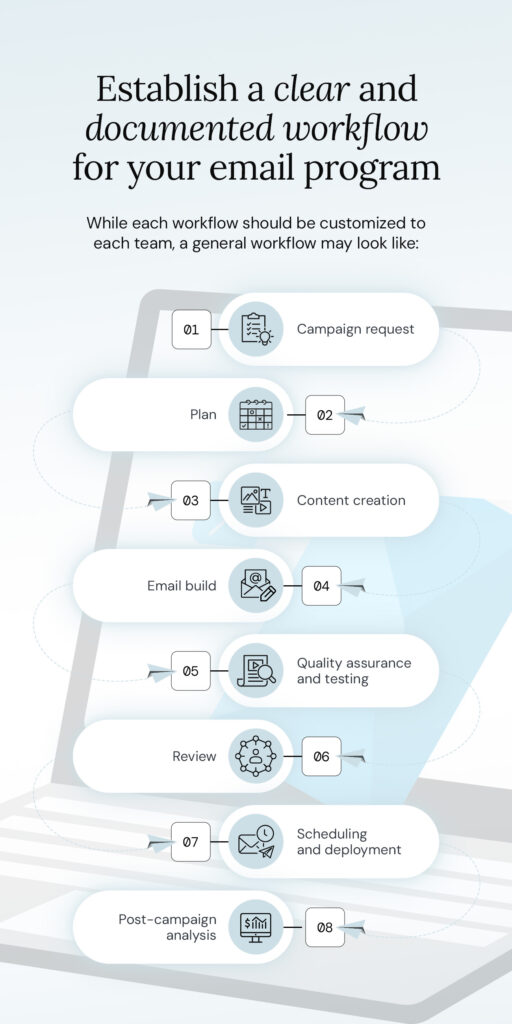
While each workflow should be customized to each team, a general workflow may look like:
- Campaign request: your team receives details about the email campaign, such as its goals, timeline, and target audience.
- Plan: create a campaign timeline, with deadlines for each step of the campaign, from content creation to quality assurance and testing.
- Content creation: write the copy, design the graphics, and create any other content for the email.
- Email build: the email developer brings all the content together to create the email.
- Quality assurance (QA) and testing: the email is checked to ensure it meets brand, quality, legal, and campaign guidelines.
- Review: stakeholders review and give final approval of the email.
- Scheduling and deployment: the email is scheduled to be sent.
- Post-campaign analysis: your team analyzes the campaign’s results.
Define roles and responsibilities
Ensure each team member knows exactly what their responsibilities are so they can see how they fit into the email campaign workflow. This approach eliminates overlapping responsibilities and gaps in the chain that result in tasks not being completed.
Everything leads to a smoother process from start to finish, without any bottlenecks as the group determines who’s responsible for the next step.
In a large team, you have the added benefit of specialist roles. While employees in a small team usually take on multiple duties, yours can specialize. Whether copywriters, graphic designers or account managers, they’re experts in their specific area.
That said, your team can only become experts when they know exactly what their role is. Clarifying roles and responsibilities exactly also means your team members can take ownership of their work. When work is done well, they can feel good about their contribution, knowing exactly what it was.
Centralize your tech stack
In 2025, 1 in 3 marketers used four to six tools to send their email campaigns, with many of these tools using AI technology. Each one helps your team achieve better results in less time, but issues arise when employees can’t use them cohesively. A fragmented toolset can cause delays, inefficiency, and breakdowns in communication between different members.
The solution is centralizing your tech stack. When you bring various tools together under one platform, you make it easy to:
- Work between multiple tools with minimal friction.
- Collaborate with co-workers.
- Build, design, test, and analyze emails from one place.
How to create consistency and quality at scale
Brand quality and consistency are necessary for successful email marketing. Sending consistently high-quality emails makes your business seem professional and trustworthy.
Implement a modular email design system
A modular email design system gives your team set email templates for creating emails. Rather than create each email from scratch, your team can save time and improve consistency by using automated code modules to build emails for different campaigns.
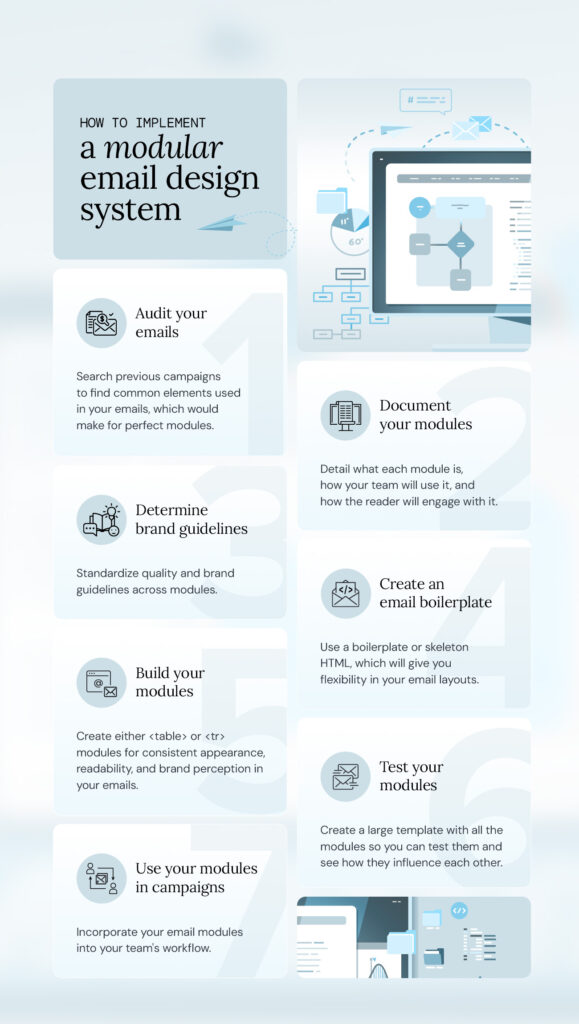
Steps to implement a modular email design system:
- Audit your emails: search previous campaigns to find common elements used in your emails, which would make for perfect modules.
- Document your modules: detail what each module is, how your team will use it, and how the reader will engage with it.
- Determine brand guidelines: standardize quality and brand guidelines across modules.
- Create an email boilerplate: use a boilerplate or skeleton HTML, which will give you flexibility in your email layouts.
- Build your modules: create either <table> or <tr> modules for consistent appearance, readability, and brand perception in your emails.
- Test your modules: create a large template with all the modules so you can test them and see how they influence each other.
- Use your modules in campaigns: incorporate your email modules into your team’s workflow.
If your team isn’t working efficiently, they’re probably spending much of the email creation process on repetitive tasks, like creating headings. With a modular email design system, you can grab the templates and snippets you need, speeding up your team’s processes, improving consistency, and reducing mistakes.
Take advantage of AI technology
AI has improved team efficiency in virtually every industry, role, and task—and email campaign management is no different. With the right tools, AI can:
- Monitor your emails to ensure links are functional and the pixel quality meets the desired standards.
- Suggest subject lines and body copy for your emails based on your campaign strategy.
- Review what you’re sending to ensure recipients are viewing and engaging with a high-quality email.
- Perform based on real-time insights from every mailbox globally.
- Assess the quality of your contact list and clean it for easier segmentation.
Many AI tools improve and continue to learn as you use them, too. By analyzing every signal, they increase their intelligence to deliver ever-improving results.
Simplify collaboration and approvals
Another way to improve your team’s efficiency is to streamline how they work. By removing unnecessary obstacles from their workflow, you can help your large team foster better collaboration in their email marketing efforts.
Create a single source of feedback
Chasing approval from various stakeholders can quickly frustrate your team. Without a single approval platform, the approval process can be overly complicated, lengthy, and confusing. Conflicting feedback from stakeholders on separate platforms slows down the process as your team works to understand which notes they should act on.
With a single platform for approvals and feedback, stakeholders know exactly where to leave their comments, and your team receives clear feedback, often cutting hours off the process. Plus, if feedback questions arise later, you’ll have a documented record of changes in one easy-to-access location.
Establish a tiered approval process
A tiered approval process takes the doubt out of who should be approving what aspects of an email campaign—and when. It also provides additional QA checks, speeds up the approval process, and improves collaboration between stakeholders and your team.
This process should be tailored to your specific team and their workflow, but a typical approach for an email campaign is:
- Content and design review: the email’s copy, layout, and graphics are checked for accuracy and quality.
- Brand and strategy review: the email is reviewed for alignment with campaign goals and brand guidelines.
- Technical review: tracking, segmentation, and analytics are tested before the email is sent.
- Compliance review: any legal or compliance requirements are assessed.
- Executive review: a final approval is given, and the campaign can go live.
Measure and improve team performance
While it’s important to measure the performance of each email campaign, it’s just as essential to measure your team’s workflows and results. Even with the best tools and techniques, your team members may still show room for improvement. In order to help your team keep growing, keep an eye on performance.
Key metrics for workflow efficiency
To accurately identify how your team can work more efficiently, measurable data is a must. This data can come from analyzing metrics such as:
- Email creation time: the time from the initial request to the final send will tell you how efficient your team is at getting campaigns live.
- Number of review rounds: more review rounds mean your team isn’t efficiently meeting the standards or goals of the campaign.
- Post-send error rates: a higher number of errors found in emails after they’ve been sent indicates that your team isn’t reviewing emails well enough before launch.
- Template usage rate: if your team isn’t using templates as often as they should, whether due to a lack of training or insufficient templates, it can slow down the creation process.
Tie team performance to campaign ROI
Boosting efficiency across your team has plenty of positive effects, such as faster email creation and fewer post-send mistakes. It all boils down to an improved ROI on your campaigns, which should be the ultimate metric for any email marketing team.
A more efficient team gets email campaigns ready for launch and successfully analyzes the campaigns’ results in less time. With that additional time, your team can focus on the strategic changes that lead to better-performing campaigns—A/B testing emails, adding personalized elements, and creating more detailed segments.
These higher-value activities have a direct impact on campaign ROI. Ultimately, personalized emails drive better engagement, A/B tests reveal what resonates with your audience, and thoughtful segmentation ensures your message reaches the right people at the right time. None of that happens if your team is working inefficiently.
Boost your team’s efficiency for better email campaigns
Efficiency can be the difference between an email campaign that just barely gets over the finish line and one that exceeds your expectations. Work faster without compromising quality by:
- Establishing clear, actionable workflows.
- Defining team roles and responsibilities so everyone knows what they need to get done.
- Centralizing your tech stack to streamline tool access and use.
- Implementing a modular email design system to speed up the email creation process.
- Establishing a tiered approval process to make approvals faster and clearer.
- Measuring your team’s performance to identify growth opportunities.