
Key Takeaways
- AI inbox summaries shape what subscribers see first, so lead email copy with your main point.
- Gmail, Apple Mail, Outlook, and Yahoo each use AI differently, so tailor every send.
- Opens are less reliable now, so measure clicks, replies, and conversions.
AI is no longer just something marketers use to write emails. It’s now a third party in every send—a layer inside the inbox that decides what gets summarized, surfaced, or skipped before a subscriber ever opens your message. Apple Mail, Gmail, Yahoo, and Outlook all have AI features that have changed what subscribers see first.
And subscribers are already acting on what they see from these AI features. In our own research, we found 55 percent of consumers said they make purchase decisions based on an AI email summary alone. This doesn’t mean mailbox providers (MBPs) are working against senders. Their goal is to make the inbox more useful and keep people coming back. AI is simply their latest tool to make that happen.
But because LLMs are non-deterministic, the same email can get a different summary each time it’s processed.
In other words, you can no longer control your brand’s first impression in the inbox, but you do have the power to influence it.
This guide is a working reference, not a trend explainer. It covers what each AI inbox feature does, what it changes about your metrics, and what to check before your next send.
Let’s get started.
Gmail
What subscribers see
- Gmail now places Gemini between subscribers and your content in three places. When a subscriber opens an email or thread, a short AI summary can appear at the top.
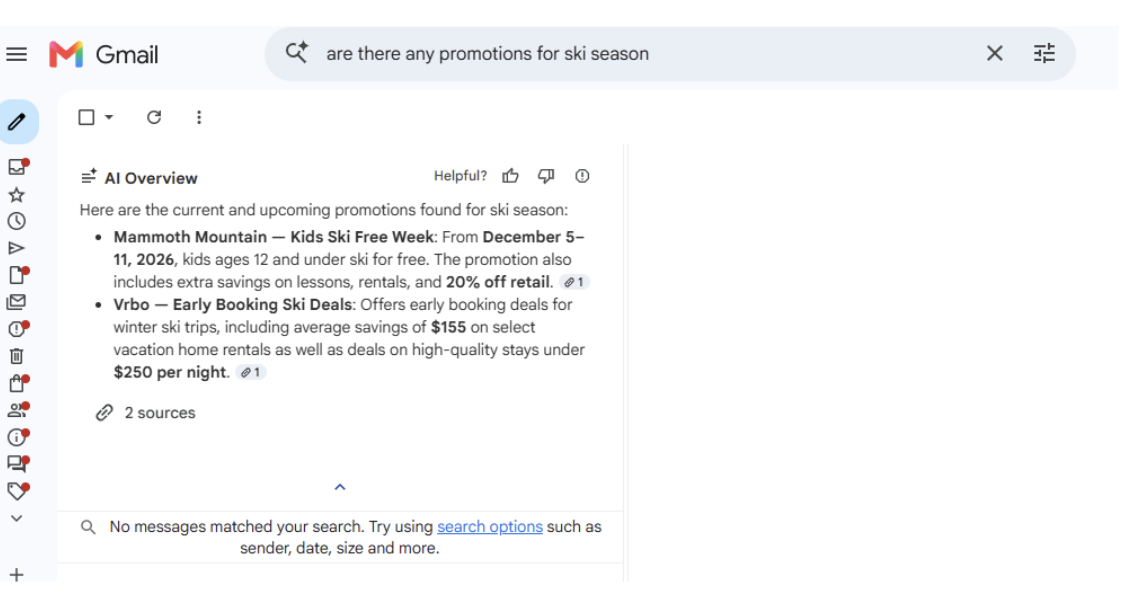
- AI Overviews in Gmail search answer natural-language questions with responses compiled from across the inbox, citing the source emails.
- For paid Google AI subscribers, the AI Inbox view also turns the message list into a briefing of suggested to-dos and topics to catch up on.
What it changes in your signals
Because Gmail’s summaries appear after the open, open rate metrics stay largely intact. However, a subscriber who gets the gist of an email from the summary has less reason to scroll or click.
AI Overviews in search go a step further and can answer questions like “Are there any promotions for ski season?” without anyone opening your email. Meanwhile, AI Inbox determines what information matters most to subscribers using signals like frequent contacts and contact lists, which tend to prioritize personal connections over brands.
Engagement still drives visibility, too, and Gmail has been deprioritizing senders who mail to unengaged audiences with lower placement in the “Most Relevant” ordering of the inbox.
What to change in your sends
- Lead with the point. Put the offer, deadline, or update in the first sentence of the body, where a summary is most likely to pick it up.
- Keep key details in live text. Codes, prices, dates, and order numbers inside images are hard for search and summaries to use.
- Give each email one job. A single clear purpose makes an email harder to summarize wrong.
- Write subject lines people can search for. “20% off running shoes through Sunday” is easier to find later than a vague, curiosity-driven line.
- Cut sends to unengaged subscribers. Sunset or re-permission inactive contacts instead of mailing them at full frequency.
- Report on clicks, replies, and conversions to increase visibility.
Apple Mail
What subscribers see
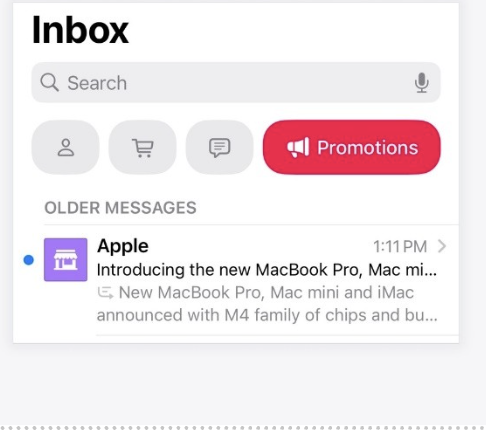
- On devices with Apple Intelligence, Apple Mail replaces the preview text under your subject line with an AI-generated summary of the email, shown before the subscriber opens.
- A Priority section pins time-sensitive mail, such as same-day events and boarding passes, to the top of the inbox.
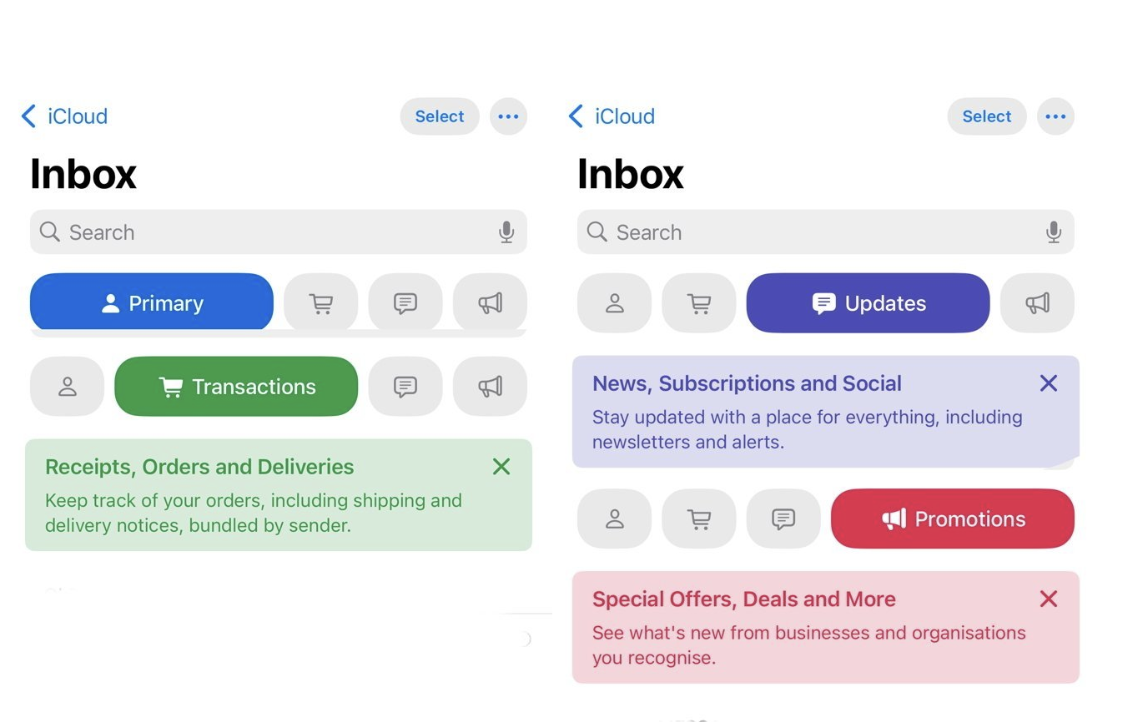
- Mail also sorts messages into Primary, Transactions, Updates, and Promotions tabs, and a Digest view groups messages from the same sender.
Since Apple Intelligence expanded to 16 languages in late 2025, this summarized, categorized inbox is the default for most Apple Mail users on supported devices.
What it changes in your signals
Apple is where AI features have the most direct impact on the open. Apple’s AI-generated summary now occupies the space traditionally reserved for your preheader text, meaning subscribers may decide whether to open based on Apple’s description of your email rather than the message you wrote.
Mail Privacy Protection already makes Apple Mail open rates unreliable, further limiting what this metric can tell you.
Where your email lands in the inbox also matters, making category placement another factor to watch. Subscribers can limit notifications to Primary, so mail sorted into Promotions may never trigger an alert.
What to change in your sends
- Treat the opening lines of the body as your new preheader. They should state what the email is and why it matters.
- Keep writing preview text for clients that still show it, but don’t count on Apple Intelligence users seeing it.
- Make the subject line and opening agree. A summary that contradicts a clever subject line undermines both.
- Keep transactional and marketing mail separate. Receipts and shipping updates loaded with promotions are harder to categorize predictably.
- Use urgent language only when it’s true. Priority is meant for genuinely time-sensitive mail, and crying wolf erodes trust.
- Measure Apple-heavy audiences on clicks and conversions instead of opens.
Outlook
What subscribers see
Outlook’s AI features are largely on demand:
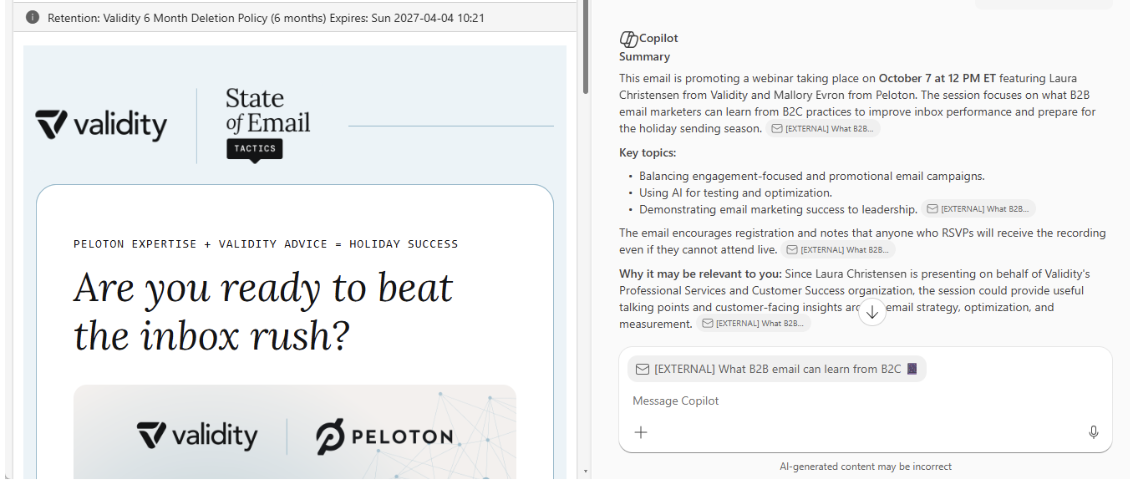
- Subscribers can ask Copilot to summarize an email thread, pulling out key points with citations to the original messages.
- Copilot Chat in Outlook can now reason across the whole inbox and calendar, answering questions like “What have I said I’d do this week?”
- The Microsoft 365 Copilot add-on can mark incoming mail as high or low priority, with an explanation of why.
Most of this reaches business users on Microsoft 365, so it matters most to B2B senders.
What it changes in your signals
Because Outlook’s AI summaries are requested after the email is opened, they have little effect on opens. The bigger shift comes from asking inbox-wide questions. A buyer can ask Copilot for the latest updates from your company and get an answer drawn from your emails without opening any of them. And when Copilot ranks priority, an email that doesn’t make its purpose clear to the reader is an easy candidate for low priority placement.
What to change in your sends
- State the ask and the deadline in plain words, early in the body.
- Name your company, product, and topic in the copy, instead of only in the logo or header image, so inbox-wide questions can find you.
- Keep important details out of attachments and images alone.
- Use descriptive subject lines across sales, onboarding, and renewal sequences so threads stay easy to find and summarize.
- Track replies, meetings booked, and pipeline influenced instead of opens.
Yahoo Mail
What subscribers see
In the new Yahoo Mail, AI summaries are on by default.
- In the Priority section of the message list, a short summary can replace your subject line, and a longer summary appears at the top when the email is opened.
- Quick action buttons let subscribers track packages or add events directly from their inbox, while unsubscribing from a sender or deleting all their messages takes just one tap.
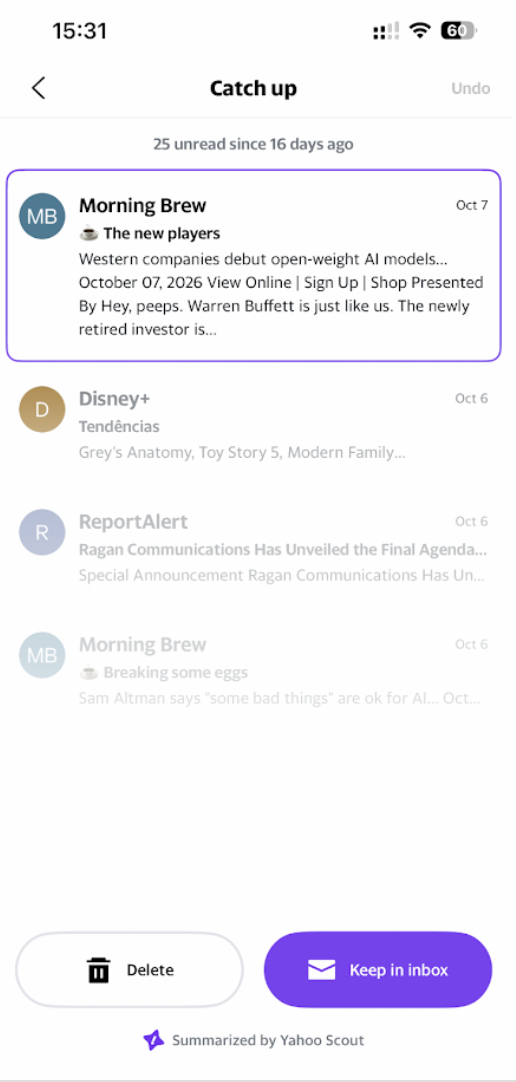
- A Catch Up feature also walks subscribers through AI summaries and asks whether to keep or delete each message.
What it changes in your signals
Yahoo gives AI features the most visible control of any provider covered here, since your subject line can be replaced outright. With Catch Up, keep-or-delete decisions are made from the summary instead of your content. One-tap delete options by sender makes an over-mailed subscriber easy to lose, along with every future email you send them.
What to change in your sends
- Write an opening line that could stand in for your subject line.
- Put order numbers, tracking links, and event dates in plain text so summaries and quick actions can use them.
- Watch your frequency. If subscribers mostly delete you in Catch Up, send less often or segment more tightly.
- Sign up for Yahoo’s Sender Hub to access the Complaint Feedback Loop and other sender data.
Seeing beyond your own sends
Every change above traces back to one problem: AI now shapes how your email is seen, and your own campaign data shows only part of that picture. A dip in clicks could come from a summary that missed your point, a shift in where a provider places your mail, or a list that has gone quiet.
Telling those apart takes a view wider than your own sends. That’s what the Validity Intelligence Network provides, drawing on signals from more than 140 mailbox providers and over 35,000 tracked brands.
Validity Engage puts that data to work around every campaign by checking placement across providers, flagging issues before they reach subscribers, and showing how your program compares with others in your market.